
Your pages are published, your content is live. So why isn’t Google ranking them?
Most business owners check keywords, check word count, but there’s one element they overlook every time: the H1 tag.
- Get it wrong, and search engines can’t confirm what your page is actually about.
- Get it right, and it becomes one of the clearest signals telling Google exactly where to rank you.
Following SEO H1 tags best practices isn’t complicated. But most websites still get it wrong in ways that quietly cost them rankings. This article covers what an H1 tag is, why it matters, how to write one correctly, and what to fix if yours are off.
What Is an H1 Tag and Why Does It Matter for SEO?
An H1 tag is the primary HTML heading on a webpage. It tells search engines, browsers, and screen readers what the page is about.
In HTML, it looks like this:
- <h1>SEO H1 Tags Best Practices: How to Write Page Titles That Rank</h1>
On the live page, it appears as the largest, most prominent heading a visitor sees. It’s the first thing search engines read to understand the page’s main topic.
Google’s John Mueller has confirmed that H1 tags help Google understand page structure. That means your H1 isn’t decoration. It’s a directional signal. A well-written H1 tells Google: this is what this page is about.
There are three reasons this matters:
1. Search engine understanding
Without a clear H1, Google has to guess your page topic from surrounding content. A strong H1 removes the guesswork and reinforces your keyword relevance.
2. User experience
Visitors decide in seconds whether they’re in the right place. A clear H1 that matches what they searched for makes them stay. A vague one sends them back to Google.
3. Accessibility
Millions of people use screen readers to navigate the web. According to a WebAIM Screen Reader User Survey, 71.6% of screen reader users navigate pages using headings. A clear H1 structure helps users understand page content quickly and improves accessibility for everyone.
None of this requires advanced SEO knowledge. It requires being precise about the one line that sits at the top of every page you publish.
How Is an H1 Tag Different From a Title Tag?
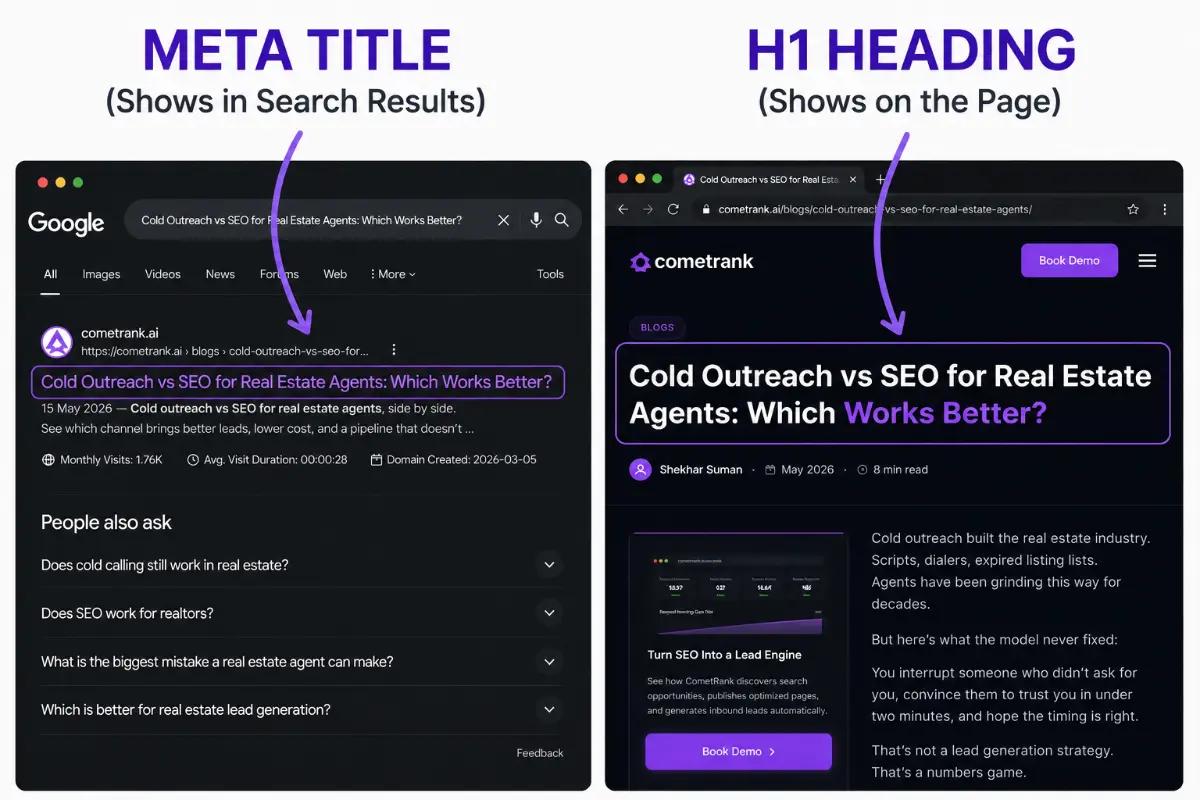
The meta title appears in search results, while the H1 appears on the page.
This is one of the most common points of confusion in SEO, and it directly affects your rankings if you get it wrong.
- Title tag: the headline that appears in Google’s search results and the browser tab. It lives in the HTML <head> section. Searchers see it before they click.
- H1 tag: the headline on the page itself. It lives in the <body> section. Visitors see it after they click.
Here’s a simple way to remember it: the title tag wins clicks, the H1 tag confirms context.
| Title Tag | H1 Tag | |
| Where it appears | Google SERP + browser tab | On the live webpage |
| Who sees it | Searchers before clicking | Visitors after clicking |
| HTML location | <head> | <body> |
| Primary purpose | Drive clicks | Signal page topic |
| Character limit | 50 to 60 characters | 50 to 70 characters |
Google recommends keeping the two aligned but not identical.
- The title tag can be optimised for click-through rate.
- The H1 can be optimised for clarity on the page.
For example:
- Title tag: SEO H1 Tags Best Practices: Fix Your Page Titles in 2026
- H1: SEO H1 Tags Best Practices for Business Websites
They cover the same topic. But the title tag uses “Fix” and a year to drive urgency in search results, while the H1 signals the topic clearly to the visitor who has already clicked.
Recommended reading:
Want to write title tags and meta descriptions that get more clicks? Check out our guide to SEO title and meta description best practices blog
Use One H1 Per Page and Put Your Keyword in It
Every important page on your website should have exactly one H1 tag. Not zero. Not two. One.
1. Use only one H1 on a page
- Using multiple H1 tags dilutes your topic signal.
- When Google sees two H1 tags on the same page, it gets conflicting signals about what the page is actually about.
- One clear H1 focuses that signal on a single topic.
Most CMS platforms (WordPress, Wix, Squarespace) assign your page title as the H1 automatically.
- If you’re unsure whether your theme handles this correctly, right-click on your page title and select “Inspect.”
- If the code shows <h1>, you’re set.
- If it doesn’t, your SEO plugin (Yoast, RankMath) can fix this in minutes.
2. Include your target keyword in your H1
Your primary keyword should appear in the H1, but it must read naturally. Google evaluates semantic meaning, not just keyword presence.
- Bad: keyword-stuffed: Best SEO H1 Tags Best Practices SEO Heading Tags Guide 2026
- Good: natural placement: SEO H1 Tags Best Practices for Business Websites That Want to Rank
The second version sounds like a headline a real person wrote. The first sounds like a keyword dump. Search engines can tell. So can your visitors.
Supporting keywords that work well alongside the primary phrase include:
- heading tag SEO
- H1 vs title tag
- heading hierarchy
- how to write H1 tag
If you’re working through a broader seo checklist for new website, H1 optimisation sits in the on-page section and should be one of the first elements you review before publishing.
What Makes an H1 Tag Actually Good?
Knowing you need an H1 is the easy part. Writing one that performs is where most pages fall short.
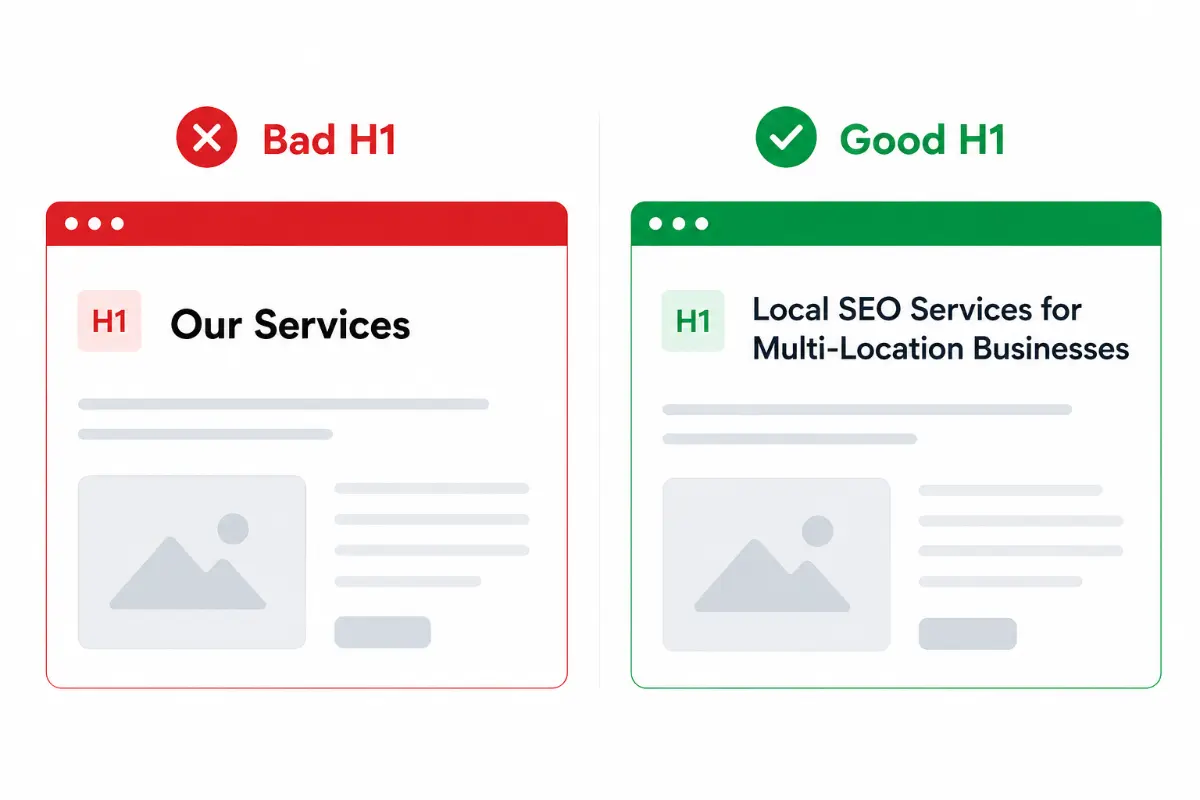
Specific H1s outperform vague headings.
1. Match the H1 to search intent
Your H1 should reflect what the visitor expects to find. This is called search intent: the reason behind the query.
- Search for “best SEO companies for small businesses” and click a result.
- If the H1 reads “Advanced Enterprise SEO Solutions,” you’ll leave. The page didn’t match your intent.
- The best SEO companies for small businesses post’s H1 says exactly what the reader searched for. That alignment is why it ranks.
To check intent before writing your H1, type your target keyword into Google and look at the H1s of the top three results. They’ll show you exactly what format and angle Google expects.
2. Keep it under 70 characters
- Most CMS platforms use your H1 as your title tag too.
- If your H1 is 90 characters, it gets truncated in search results, cutting off the keyword that drives clicks.
- 50 to 70 characters is the safe range.
3. Use title case
- Capitalise the main words in your H1 the same way you’d write a news headline.
- “SEO H1 Tags Best Practices for Business Websites” reads as a professional title.
- “seo h1 tags best practices for business websites” looks like a URL slug dropped onto a page.
4. Be specific, not clever
- Vague H1s lose rankings and visitors.
- “Our Services” tells Google nothing.
- “Local SEO Services for Multi-Location Businesses” tells Google exactly who this page is for and what it covers.
Every word in your H1 should earn its place. If you can remove a word and the headline still communicates the same thing, remove it.
How to Structure Your Heading Hierarchy Below the H1
The H1 is the top of your page’s heading structure. Everything below it should follow a clear order.
The correct heading hierarchy of a SEO optimized page
- H1: One per page. Main topic. Your primary keyword lives here.
- H2: Section headings. Each one covers a major subtopic. Supporting keywords naturally fit here.
- H3: Sub-points within an H2. Only use H3s when an H2 section has two or more distinct sub-topics worth separating.
Here’s what a correct structure looks like for an article on multi-location SEO:
- H1: SEO Strategy for Businesses With Multiple Locations
- H2: Why Multi-Location SEO Needs a Different Approach
- H2: How to Create Location-Specific Landing Pages
- H3: What to include on each location page
- H3: How to avoid duplicate content across locations
- H2: Internal Linking Between Location Pages
- H2: How to Measure Results Across Locations
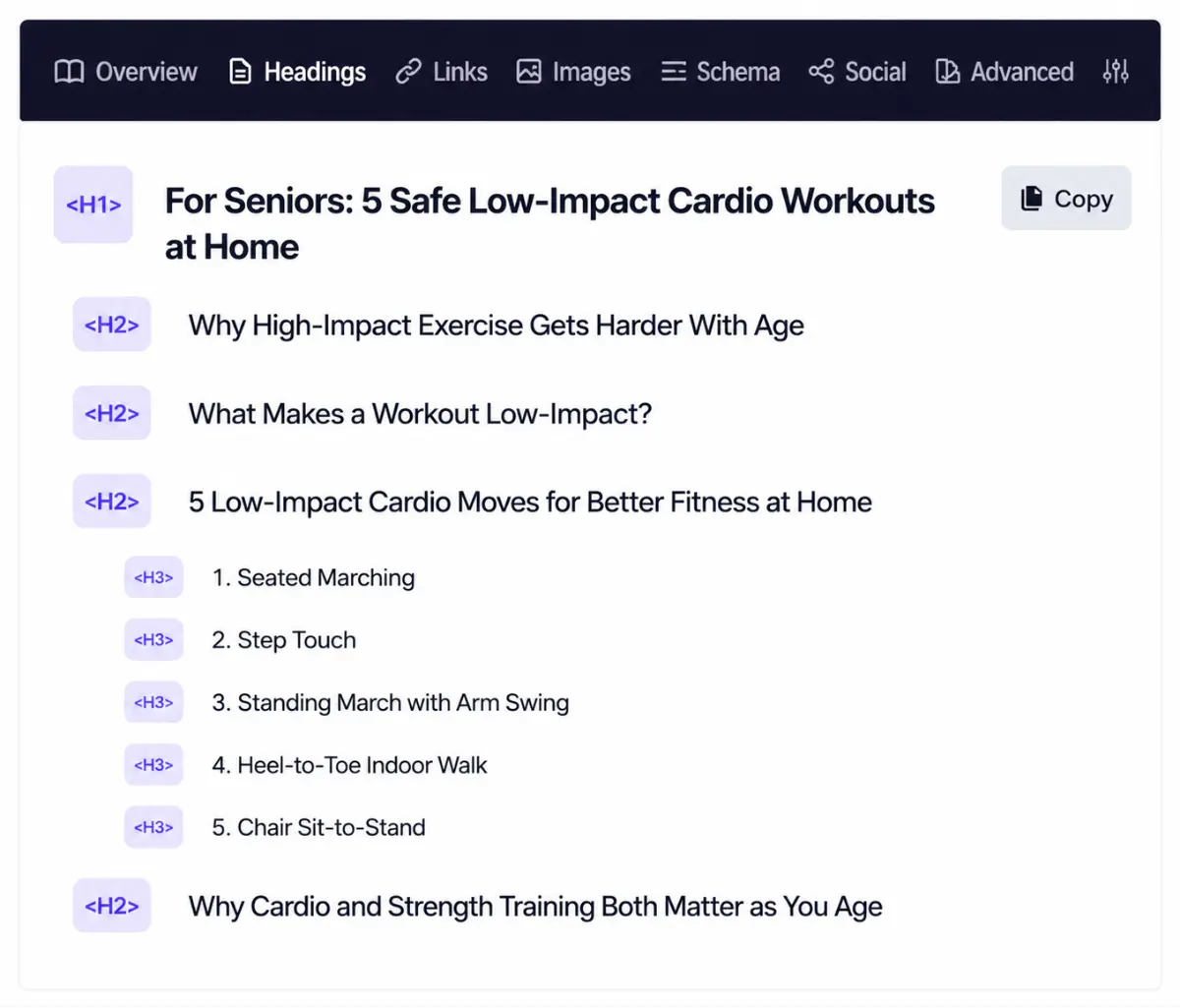
A logical heading structure improves content organization.
This is the structure explained in the seo strategy for multiple locations guide. The heading hierarchy tells Google the page covers multi-location SEO comprehensively, not just tangentially.
Skipping heading levels or using H2s for visual formatting instead of structure breaks the signal.
- Google and AI systems both use heading structure to decide which sections to extract for featured snippets and AI Overviews.
- A clear hierarchy increases your chances of being cited.
Recommended Reading:
For a full walkthrough of the on-page elements that work alongside heading structure, the 15 of the most important on-page seo tactics article covers each one in detail.
6 Common H1 Mistakes That Are Quietly Hurting Your Rankings
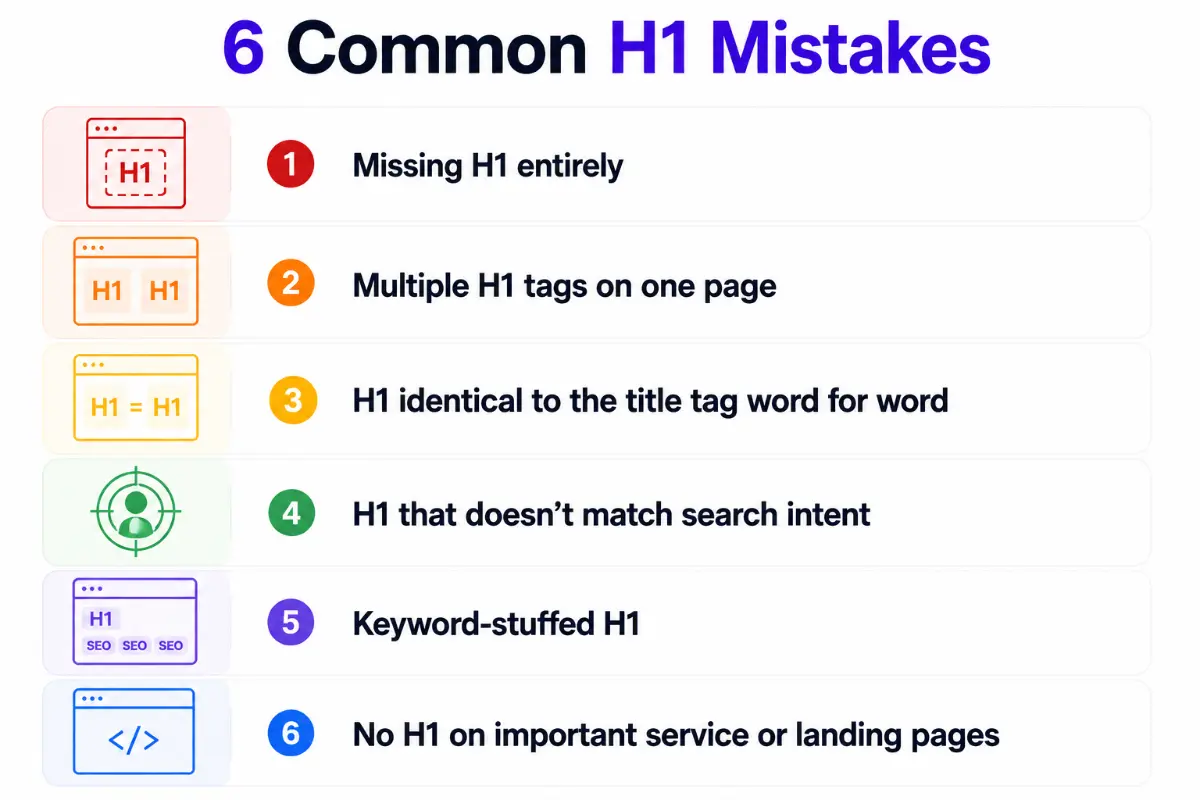
Avoid these H1 mistakes to improve clarity and rankings.
1. Missing H1 entirely
If no H1 is present on the page, Google has no primary heading signal to work with. Some page builders and themes accidentally strip H1 tags or apply heading styles visually without using the correct HTML tag. Run a site audit to check.
2. Multiple H1 tags on one page
WordPress page builders, especially those using custom blocks, sometimes generate multiple H1s. One is your page title. Another is a hero banner headline. Google sees two H1s and gets a conflicting topic signal.
3. H1 identical to the title tag word for word
This is a missed opportunity. Your title tag can use one angle (urgency, year, action word) while your H1 clarifies the topic on the page. Identical tags mean you’re not optimising either one fully.
4. H1 that doesn’t match search intent
If your page targets “SEO for real estate agents” but the H1 reads “Grow Your Business Online,” you’re losing the ranking signal that keyword alignment provides. Make the intent match obvious and immediate.
5. Keyword-stuffed H1
Repeating the keyword phrase three times in the H1 doesn’t strengthen the signal. It weakens the page’s credibility with both Google and visitors. Natural, single placement wins.
6. No H1 on important service or landing pages
Blog posts often get H1s by default. Service pages, location pages, and product pages frequently don’t. Every page you want to rank needs an H1.
This is especially relevant for how to conduct a technical seo site audit. H1 issues are consistently among the first things a crawl will surface.
Write H1 Tags That Work for AI Search and Featured Snippets
Google now generates AI Overviews and featured snippets using structured content from high-ranking pages. Your H1 tag plays a role in whether your content gets cited.
AI systems and Google’s snippet algorithms extract clean, structured answers from pages with:
- A descriptive H1 that signals the topic clearly
- Answer-first writing immediately below each heading
- Specific, concrete language rather than vague generalisations
- A logical heading hierarchy that maps out the page’s content
A vague H1 like “Our SEO Services” tells AI systems nothing about what the page is authoritative on. A specific H1 like “AI SEO Services for B2B Manufacturing Companies” tells the system exactly who the page serves and what it covers.
The same principle applies to featured snippets.
- Google extracts content from pages where the heading directly matches the query.
- The content below it must answer the question immediately.
- If your H1 matches what someone searched for, and your first paragraph answers the question directly, you become a candidate for snippet position.
This is the same logic behind GEO (generative engine optimisation), which is the practice of structuring content so AI platforms can easily extract and cite it. If you’re building content for both Google and AI search visibility, your H1 structure is the starting point.
How CometRank Handles H1 Optimisation at Scale
Fixing one H1 is a 30-second task. Fixing every H1 across 80 pages and keeping them correct as new pages get published is where most businesses run out of bandwidth.
We’re an AI SEO agency that runs SEO through CometRank, our proprietary software. Six AI agents handle the full workflow.
- The Analyst agent studies the business, competitors, customer profiles, and pain points before any content is created.
- The Strategist agent performs intent mapping and keyword research across all four keyword types.
- The Creator agent writes page titles and headings to match search intent from the start, so there’s nothing to fix after the fact.
- The Optimizer agent audits on-page structure, including H1 tags, heading hierarchy, and keyword placement, across every page before it goes live.
- The Authority Builder agent runs the AI-driven backlink and citation strategy.
- The Quality Guardian agent checks content quality, formatting, and publishing accuracy before anything goes live.
A human SEO captain sits on top of all six, reviewing intent mapping, content quality, and internal linking across every batch.
The result? Every page we publish ranks for the right topic from day one, with correct heading structure baked in. If you want to see what this looks like for your site, book a demo, and we’ll run a visibility audit in the same session.
The H1 Tag Is a Small Element With Real Ranking Weight
Most businesses spend months debating content length and keyword density, then publish pages where:
- The H1 doesn’t match the search query
- The title tag and H1 are identical
- The heading hierarchy is broken three levels in
The SEO H1 tags best practices in this article aren’t complicated.
- One clear H1 per page.
- Keyword in the H1 written naturally.
- H1 and title tag related but not identical.
- Heading hierarchy that makes the page easy to read and extract.
Get these right across your site and you remove a consistent source of ranking friction. Every page becomes a clearer signal to Google about what it covers and who it’s for.
Start with your five highest-priority pages. Fix the H1s. Then audit the rest.
SEO H1 Tags Best Practices: Frequently Asked Questions
1. Does the H1 tag directly affect Google rankings?
The H1 tag isn’t a confirmed ranking factor by Google, but it’s a strong topic signal that helps Google understand what your page is about. Pages with clear, keyword-aligned H1 tags tend to rank better for their target queries because they reduce ambiguity for the search engine.
2. Can you have more than one H1 tag on a page?
Technically yes, but it’s not recommended. Multiple H1 tags send conflicting topic signals to search engines. John Mueller of Google has stated that multiple H1s won’t trigger a penalty, but the best practice is one H1 per page to maintain a clear, focused topic signal.
3. Should your H1 tag be exactly the same as my title tag?
No. They should be related and cover the same topic, but they don’t need to be identical. Your title tag can be optimised for click-through rate in search results, while your H1 clarifies the topic on the page itself. Using slight variations lets you target different keyword angles and improve both metrics.
4. How long should an H1 tag be?
Keep it between 50 and 70 characters. Many CMS platforms use the H1 as the title tag by default, and anything over 60 to 70 characters risks truncation in search results. Aim for a headline that’s complete and clear within that range.
5. What’s the difference between an H1 and an H2 tag?
The H1 is the main heading of the page and there should be only one. H2 tags are section headings that divide the page into major subtopics. H3 tags are used for sub-points within an H2 section. Together, they create a heading hierarchy that helps Google and visitors navigate the content.
6. How do you check if your pages have correct H1 tags?
Right-click on your page title and select “Inspect.” Look for <h1> in the highlighted code. Alternatively, run a site audit using a tool like Ahrefs Site Audit or Semrush Site Audit, which flags pages with missing, duplicate, or multiple H1 tags across your entire site.